Embedding in external websites
Bobuild lets you embed your pages in other websites. This is useful if you want to add interactive content to a blog post or to a website you own without having users leave your site — including WordPress sites.
Embedding a page
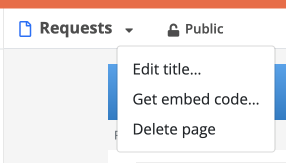
To embed a page, you need to get the embed code from the page settings. To do this, open the page settings and click on the arrow button close to the page title, then select "Get embed code":
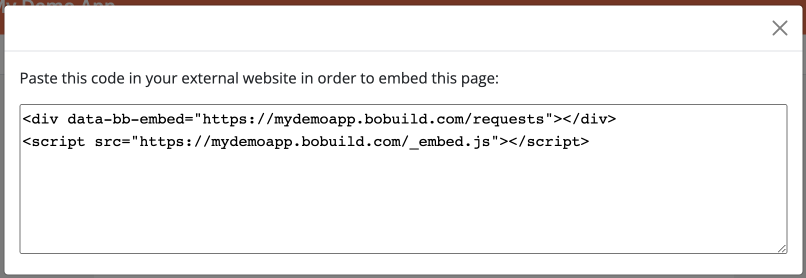
This will open a dialog with the embed code. Copy the code and paste it in the website where you want to embed the page:
Your page will be embedded seamlessly in your website, with a transparent background in order to match your background color. Also, the header bar will be hidden, so that the page will look like it's part of your website.
Navigation
When clicking a link in the embedded page, the new page will be still opened as an embed. Thus, not only the first page will be embedded, but also all the pages that are opened from the first page in order to provide a full navigation experience. This is useful if you want to embed a page that contains a menu widget, for example.
WordPress
Typical approaches:
- Custom HTML block (block editor) — paste the embed iframe code into a Custom HTML block on the page or post.
- Classic editor / widget — paste the same code into a Custom HTML widget or the page source.
- Landing pages — embed only the Bobuild form or catalogue page; keep marketing copy in WordPress.
Tips:
- Use a dedicated Bobuild page designed for embed (no duplicate site chrome — Bobuild already hides the header bar).
- Match background colours via Customize or a transparent-friendly page layout.
- If you use a custom domain, generate the embed code after the domain is active so visitors stay on your brand.
- Test login flows inside the iframe (some browsers restrict third-party cookies — prefer magic link / SSO patterns you have verified, or open auth pages full-screen when needed).
- On caching/security plugins, allow the Bobuild frame host so the iframe is not stripped.
Design tips for embedded pages
- Prefer a single primary widget (form or gallery) above the fold.
- Put long help text in WordPress; keep Bobuild focused on the interactive part.
- Set follow-ups to stay within the embedded page tree so users do not “break out” unexpectedly.
- For complex apps, embed an entry page with a Menu rather than deep-linking only to a detail URL.
Related
- Integrations — API and automation companions to embed
- Customize — CSS/JS when the host site needs tighter visual match
- Pages — default portal and visibility