Customization
Customizing the appearance of your app is the fastest way to make a portal feel like your product — not a generic tool. Logo, navbar colour, theme knobs, fonts, CSS, JavaScript, and a site-wide footer turn a functional backoffice into something staff and citizens recognise, with room for analytics, accessibility helpers, or legal notices without rebuilding pages one by one.
Typical scenarios:
- match corporate brand guidelines with logo and navbar colour in minutes;
- pick a colour scheme, corner style, font, and base size without writing CSS;
- tweak spacing or typography with CSS so dense grids stay readable;
- add a small JavaScript helper (analytics, chat widget, keyboard shortcut) on every page;
- show a privacy policy or accessibility statement in a footer shared across the whole app.
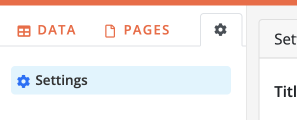
Open Customize from the Builder sidebar (under the settings area).
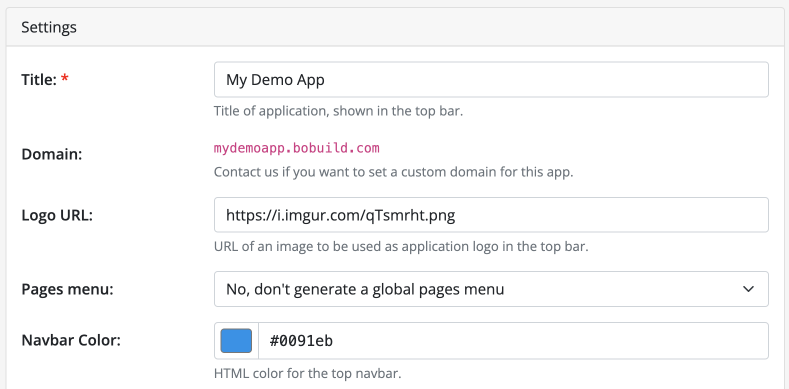
Logo, favicon, and navbar colour
Logo
Set the image in the top bar in either way:
- Logo URL — link to an image hosted elsewhere (live preview once the URL is set)
- Upload an image — PNG, JPEG, GIF, WebP, or SVG stored by Bobuild (alternative to a URL; use Remove to switch back to a URL or clear the logo)
The app Title (under Settings) is used as alternative text for the logo.
Favicon
Upload a custom favicon for browser tabs and bookmarks — PNG, ICO, JPEG, GIF, WebP, or SVG (max 512 KB). Preview and Remove are on the same Customize page. When no favicon is uploaded, Bobuild uses its default icon.
Navbar colour
Set Navbar Color — HTML colour for the top navbar (colour picker or hex value; UI label stays Navbar Color).
The primary navbar colour also influences the overall feel of buttons and chrome in the live app.
- How to configure it in the builder
- How it looks like in the resulting app

Appearance
On the same Customize page, set theme options that apply across the live app:
| Option | Choices |
|---|---|
| Corners | Sharp, Normal (default), Rounded |
| Color scheme | White, Light, Medium, Dark, Very dark |
| Font | Open Sans (default), Titillium Web, Space Grotesk, Plus Jakarta Sans, DM Sans, IBM Plex Sans |
| Font size | Small, Normal (default), Large |
These knobs are a starting point; Custom CSS can still override specifics.
Custom CSS
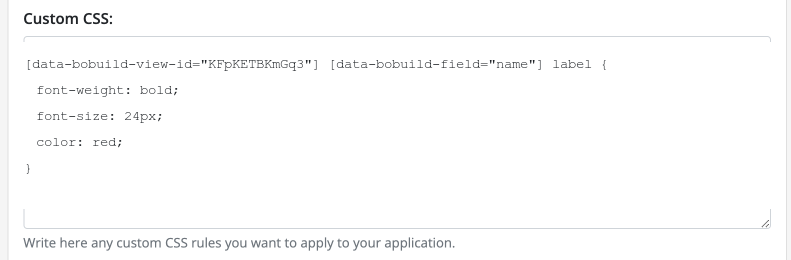
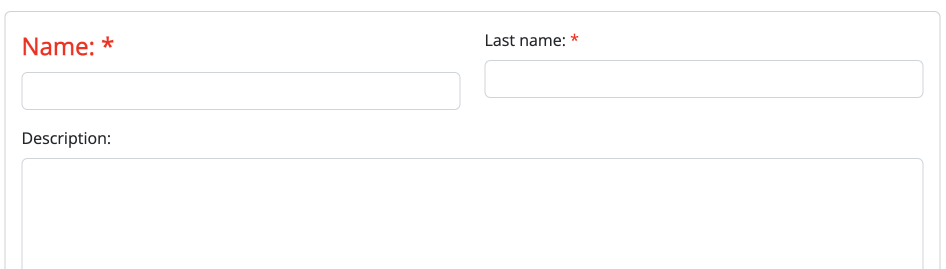
If you have more sophisticated needs, add custom CSS rules for your app — fonts, spacing, colours, or light animations.
The best way to discover element identifiers is a browser DOM inspector (for example Chrome DevTools). Prefer the public hooks so rules do not break when internals change, and scope them so they do not leak across the whole product:
[data-bobuild-page-url="/foo/bar"]or.bobuild-page— limit a rule to a specific page[data-bobuild-view-id="xxxxxxx"]or.bobuild-view— limit a rule to a specific widget[data-bobuild-field="status"]or.bobuild-field— target a form field wrapper
Do not rely on internal selectors such as .app-page, .app-view, [data-url], [data-view-id], or Selectize classes — they are not part of the public contract and may change without notice. The Builder may show advisory warnings when Custom CSS uses those patterns.
If you're in doubt, don't hesitate to contact us. We can help you figure out the right CSS rules to use.
- How to configure it in the builder
- How it looks like in the resulting app
Custom JavaScript
The Custom JS box runs on your live app pages. Use it for light enhancements that do not belong inside a single widget: analytics snippets, third-party widgets, or small UX helpers.
Keep scripts focused and defensive. Use only the stable Bobuild public API below instead of internal helpers or other selectors. For richer, data-driven custom screens, prefer a Custom View widget — Custom JS is best for global behaviour shared across pages.
The Builder may show advisory (non-blocking) warnings when Custom CSS or Custom JS matches common fragile patterns (internal selectors, deprecated helpers). The same scan appears in App Health.
Test Custom JS on a staging app first. A syntax error here affects every page for every user.
Public API (window.Bobuild)
Custom JS is injected at the end of the live page body (after the platform scripts). After AJAX view reloads, use lifecycle events to catch updates.
Forms
| Method | Purpose |
|---|---|
Bobuild.getFieldValue(viewId, fieldName) | Read the current field value (scalars, booleans, arrays for multi-value fields) |
Bobuild.setFieldValue(viewId, fieldName, value) | Set the value and update the control |
Bobuild.setFieldError(viewId, fieldName, message) | Show a validation message; pass null or '' to clear |
There is no getFieldEl() — do not scrape field markup.
Views and page
| Method | Purpose |
|---|---|
Bobuild.reloadView(viewElOrId) | Reload a filterable view (grid and similar) without a full page refresh |
Bobuild.getView(viewId) | Widget root element, or null |
Bobuild.getPage() | Page root element, or null |
UX
| Method | Purpose |
|---|---|
Bobuild.alert(message) | Non-blocking alert in the app chrome |
Bobuild.confirm(message) | Promise resolving to true / false |
Bobuild.announce(message) | Accessibility live-region announcement |
Bobuild.openModal(url) / Bobuild.closeModal() | Platform popup modal |
Bobuild.redirect(url, opts) | Navigate (full page and/or popup) |
Events
Bobuild.on(eventName, filterOrHandler, handler?);
Bobuild.off(eventName, filterOrHandler, handler?);
| Event | When |
|---|---|
view:load | A widget root was (re)initialized after load or AJAX |
page:load | Page container finished init |
field:change | Logical field value changed ({ viewId, fieldName, value }) |
form:before-submit | Before the form save POST — cancellable; handlers may be async |
Filters (where supported): { viewId }, or { viewId, fieldName } for field:change.
Example — block submit and show a field error:
Bobuild.on('form:before-submit', { viewId: 'abc123' }, async (event) => {
  const ok = await validateAsync();
  if (!ok) {
    event.preventDefault();
    Bobuild.setFieldError('abc123', 'year', 'This year is already in use.');
  }
});
Example — reload a grid:
Bobuild.reloadView('xyz789');
DOM hooks for CSS and identity
Public attributes (additive alongside internal ones): data-bobuild-page, data-bobuild-view, data-bobuild-view-id, data-bobuild-view-type, data-bobuild-field, data-bobuild-field-type. Optional CSS classes: bobuild-page, bobuild-view, bobuild-field, bobuild-view-contents.
Do not rely on other selectors not documented here as they might change or disappear without notice.
Custom View scripts receive BB_CUSTOMVIEW_URL and BB_CUSTOMVIEW_CONTAINER — those remain part of the public contract.
Custom footer HTML
Custom Footer HTML is included at the bottom of every page. Common uses:
- legal links (privacy, cookies, terms)
- accessibility or contact statements required by your organisation
- small branding lines that should never be forgotten on a new page
Paste valid HTML. Keep it compact — footers appear on forms, grids, and public portals alike.