API
Bobuild lets you expose your data via a REST API. This is a powerful feature in many scenarios:
- you want to make your data available to a third-party website or a mobile app
- you want to build a script that retrieves data from your app and pushes it to a third-party system
- you want to build a script that retrieves data from a third party system and pushes it to your app
- you want to build a script that retrieves data from your app, processes it and uploads it back
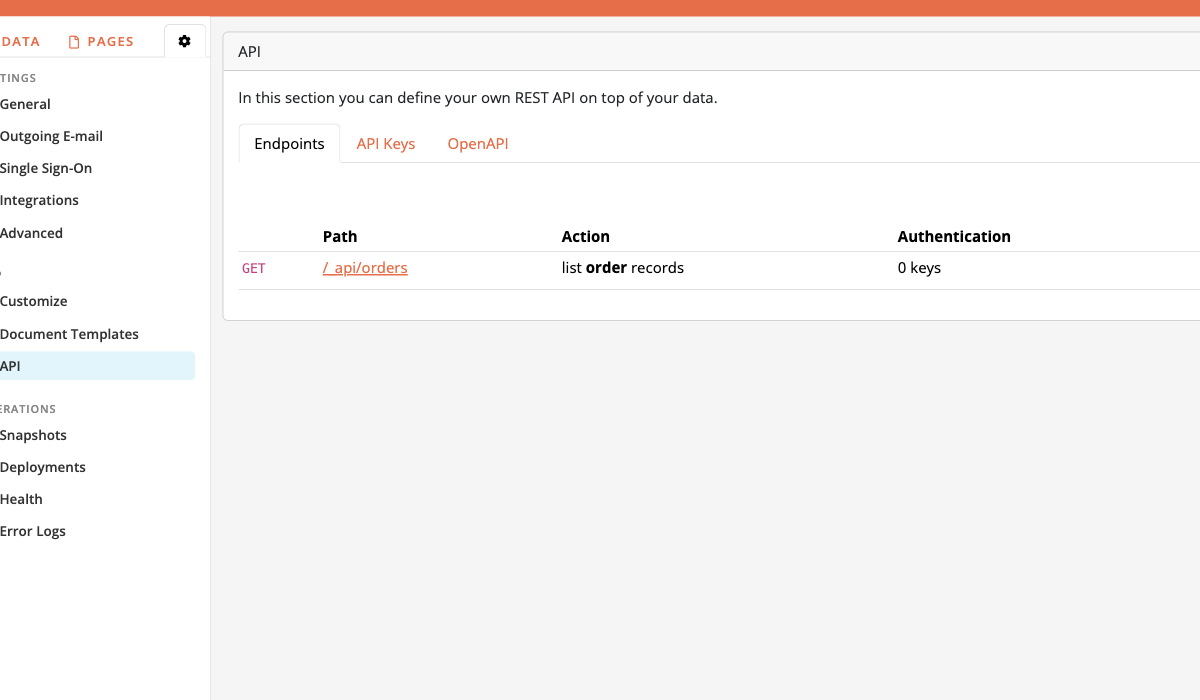
Endpoint configuration UI
The API settings page lists every endpoint (method, path, action, authentication).
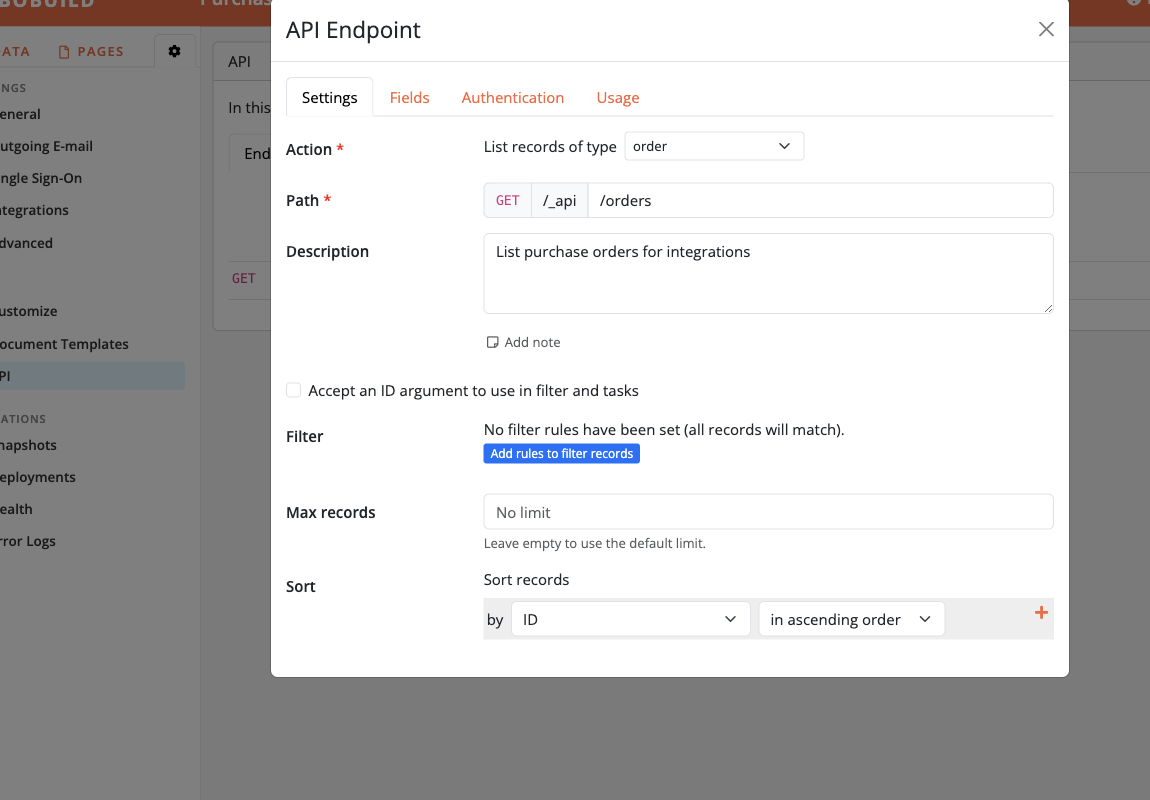
General / path
On an endpoint’s Settings tab you choose the action (list, create, …), object, HTTP path under /_api, optional description, ID argument, filter, paging, and sort.
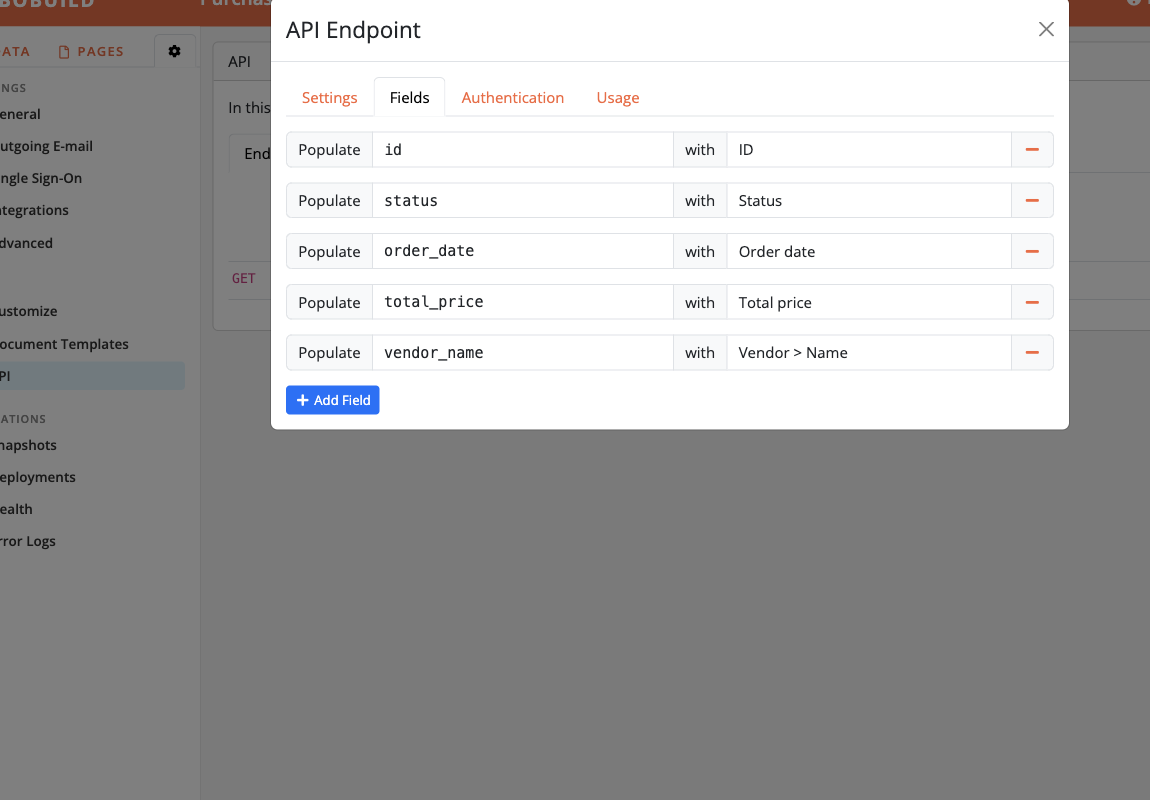
Fields
The Fields tab maps which object fields (and linked fields) are returned or accepted, with optional rename via Populate.
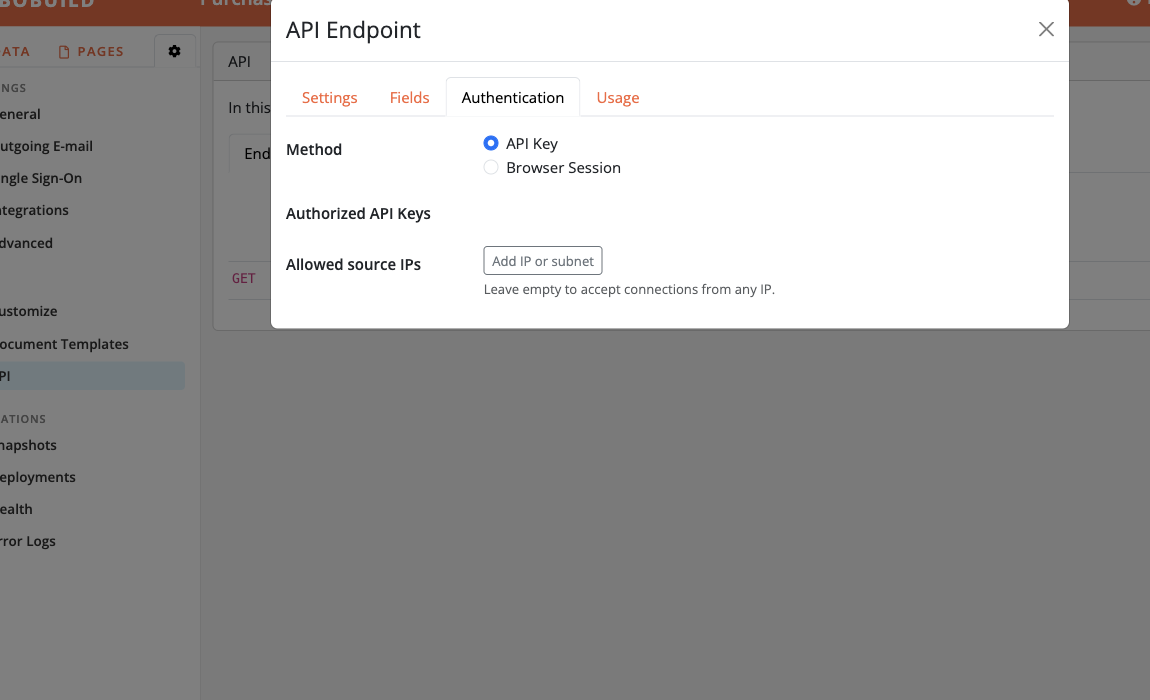
Authentication
The Authentication tab picks API Key and/or Browser Session, which keys are allowed, and optional source IP allowlists.
Filter
List and related endpoints can restrict rows with a Filter on the Settings tab (same builder filter UI as widgets). Leave it empty to return all records the caller may access.
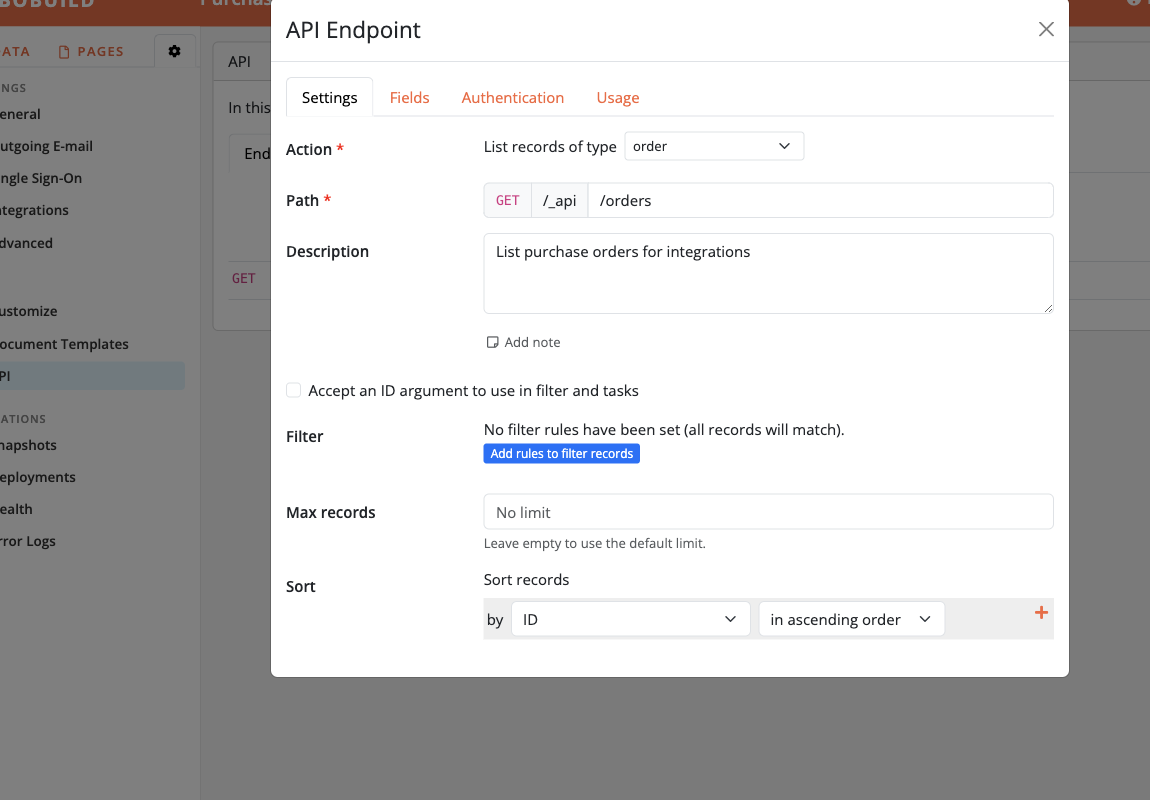
With this feature you can actually build your own API without any coding. Just define the endpoints you need, the fields you want to expose and the authentication method you want to have. Bobuild provides you with a powerful way to create as many integrations as you and your users need, even with multiple different views of the same data according to the user roles. For embed, iPaaS, and mobile patterns around the API, see Integrations.
Contact us in order to enable it for your app.
Defining your endpoints
Creating an API for your app is a matter of defining one or more endpoints. An endpoint is just the URL that an external client will call, always beginning with https://YOURDOMAIN/_api followed by an arbitraty path that you can decide. This allows you to design your naming scheme in a very flexible way.
For each endpoint you can choose one of the following behaviors:
| Endpoint type | HTTP method | Numeric parameter | Description |
|---|---|---|---|
| List | GET | Optional | Returns a list of records matching a given criteria |
| Aggregate | GET | Optional | Returns grouped totals (same engine as pivot / chart) |
| Create | POST | Optional | Accept data from the client and create one or more records |
| Modify | PATCH | Mandatory | Accept data from the client and modify one record |
| Delete | DELETE | Mandatory | Delete a record |
Endpoints with a numeric parameter will be in the form https://YOURDOMAIN/_api/ENDPOINT/1. The numeric parameter can be used freely in the endpoint filter to define an authorization logic.
Suppose you want to expose a catalog of songs and accept submissions of reviews. You'll create the following endpoints:
| URL | HTTP method | Type | Description |
|---|---|---|---|
https://myapp.bobuild.com/_api/songs | GET | List | Return all songs |
https://myapp.bobuild.com/_api/song-review/34 | POST | Create | Create a new review for the song with ID 34 |
List
List endpoints return a JSON object holding a list of records matching a given criteria. They are conceptually very similar to a grid widget because they return tabular data. For a list endpoint you'll need to configure:
- the filter criteria to select the records to return
- the list of the fields to return for each record
- the sorting criteria to use to return the records
Records are returned in pages. This means that if your filter matches more than 100 records, only the first 100 will be returned. However, a total property will be returned signalling that there are more records to retrieve. At that point, the client can just invoke the API endpoint again, passing the ?page=2 parameter and so on until the retrieved items match the total property.
List responses also include HTTP Link headers with rel="next" and rel="prev" when applicable, and the same URLs in a JSON _links member ({ "next": { "href": "…" }, "prev": { "href": "…" } }) when those relations exist. Prefer those URLs over hand-building page numbers. When the endpoint returns the record id and sorts by id, the next link uses a stable keyset filter (?id:gt=… or ?id:lt=… depending on sort direction) so inserts or deletes between requests do not skip or duplicate rows; otherwise next stays page-based (?page=).
If a List query parameter does not parse (for example a non-numeric page, or a filter value that is invalid for that field type), the endpoint responds with HTTP 400 and { "success": false, "error": "Invalid request parameters" } instead of treating the bad value as an empty result set.
A GET call to https://myapp.bobuild.com/_api/songs will return:
{
    "page": 1,
    "total": 305,
    "items": [
        {
            "id": 1,
            "title": "Song nr. 1",
            "year": 1985
        },
        {
            "id": 2,
            "title": "Song nr. 2",
            "year": 1999
        },
        ...
    ],
    "_links": {
        "next": { "href": "https://myapp.bobuild.com/_api/songs?page=2" }
    }
}
This will only contain the first 100 items. Follow _links.next.href (or the Link header) until there is no next link, or until the retrieved items match the number in the total property.
Note that your clients can supply custom filter parameters. Such parameters will be applied on top of the filter you defined for the endpoint, so they will only have the effect of further restricting the set of records returned by your endpoint. Examples:
https://myapp.bobuild.com/_api/songs?year=1999 to get only the records whose year.
Examples of API calls with custom filters:
https://myapp.bobuild.com/_api/songs?year=1999(all songs with year = 1999)https://myapp.bobuild.com/_api/songs?year:gt=1998(all songs with year > 1998)
Aggregate
Aggregate endpoints return pre-grouped totals — the API counterpart of a pivot or chart, not one JSON object per record. Prefer them from Custom Views and Custom JS (session auth) instead of downloading a full List and aggregating in the browser.
Configure:
- Object and base filter (always applied)
- Dimensions — groupings (
variablebecomes the response key,field,axisof row or column, sort direction, optional date/time formats). At most five dimensions per axis. - Measures — aggregations (
variable,op, andfieldwhen needed). Ops:count,count_distinct,sum,avg,min,max,text. At most ten measures; default is a simple count. - Optional sort measure and limit (top-N distinct primary-row dimension values after sorting)
- Optional query-string filter field mappings (same idea as List filters)
- Max items — hard cap on group combinations (HTTP
400when exceeded)
Response shape (flat cells — clients reshape for charts):
{
  "items": [
    {
      "dimensions": { "region": "North", "product": "Widget" },
      "measures": { "count": 12, "revenue": 4500 }
    }
  ],
  "total": 1,
  "meta": {
    "dimensions": [
      { "variable": "region", "field": "region", "axis": "row", "dir": "asc" },
      { "variable": "product", "field": "product.name", "axis": "column", "dir": "asc" }
    ],
    "measures": [
      { "variable": "count", "op": "count" },
      { "variable": "revenue", "op": "sum", "field": "amount" }
    ]
  }
}
Create
Create endpoints can create one or multiple records with a single call. You can think of them as the API counterpart of a form widget. Clients are supposed to send a JSON payload representing the fields of the record to be created.
When configuring a Create endpoint you'll define which fields will be accepted from the client, and which ones will be required as mandatory. Remember that IDs are always auto-assigned by Bobuild so clients will not be able to supply the ID of the record to be created.
Here's the payload that a client might want to send with a POST request to https://myapp.bobuild.com/_api/song-review/34:
{
  "rating": 4.5,
  "comment": "Feels good"
}
In order to create multiple records with a single call, an array can be sent instead. Let's see how to create multiple songs with one request. Client will send a POST request to https://myapp.bobuild.com/_api/add-songs with the following payload:
[
  {
    "title": "Song nr. 1",
    "year": 1985
  },
  {
    "title": "Song nr. 2",
    "year": 1999
  }
]
In case the creation is successful, a positive reply will be returned with the ID of the newly created record:
{
  "success": true,
  "object": "song_review",
  "id": 675
}
If you created multiple records, the reply will take this form:
{
  "success": true,
  "object": "song_review",
  "id": [675, 676, 677]
}
If the client provides an invalid payload, an error message will be returned:
{
  "success": false,
  "error": "Invalid data for field: cover"
}
Similarly to a form widget, one or more tasks can be attached to a Create endpoint that will be executed after the record creation. See Input validation for required fields and database-aware checks.
Modify
Similarly to Create endpoints, Modify endpoints are the API counterpart of a form widget. Their purpose is to modify one single record. Clients are not required to submit the entire record but can provide just the subset of the fields they want to modify.
When configuring a Modify endpoint, you define what fields are allowed to be modified.
Here's the payload that a client might want to send with a PATCH request to https://myapp.bobuild.com/_api/modify-song/34:
{
  "year": 2001
}
If the modification was successful, a positive response will be returned:
{
  "success": true
}
If the client provides an invalid payload, an error message will be returned:
{
  "success": false,
  "error": "Invalid data for field: year"
}
Similarly to a form widget, one or more tasks can be attached to a Modify endpoint that will be executed after the record update. See Input validation.
Delete
A Delete endpoint simply takes an ID of a record to delete and replies back to the client. You can configure a filter criteria to decide if the record can be deleted or not.
If the deletion was successful, a positive response will be returned:
{
  "success": true
}
Otherwise, an error message will be returned:
{
  "success": false,
  "error": "Record not found"
}
One or more tasks can be attached to a Delete endpoint that will be executed after the record deletion.
If you want to expose an API endpoint that performs multiple deletions at a single time (even across different objects) or you want a more fine-grained control over the execution of the tasks before/after the deletion, it is advisable to use a Modify endpoint instead with one or more delete tasks attached to it instead.
Input validation
Create and Modify endpoints should reject bad payloads the same way a well-built form does — before bad data spreads to other systems. Bobuild combines field rules with optional task checks.
Typical scenarios:
- a mobile app must send a required title and a rating within range;
- an integration must not create overlapping bookings;
- invalid JSON field types should fail with a clear
400instead of partial saves.
Field and type checks
On the endpoint Fields tab you choose which fields the client may send. For Create endpoints you also mark which of those fields are required.
Bobuild still applies the object's field constraints (for example min / max on numbers, length limits, and type checks). Invalid or missing data returns:
{
  "success": false,
  "error": "Invalid data for field: year"
}
(or a similar message naming the offending field). Fix the payload and retry — nothing is committed when validation fails at this stage.
Database-aware validation with tasks
Field rules cannot express “this row must not conflict with other rows already stored”. For that, attach a Raise a validation error task to the Create or Modify endpoint (same action as on forms).
The record is written and tasks run in one transaction. If the action fires:
- remaining task actions stop
- the transaction rolls back
- the API responds with HTTP
400and:
{
  "success": false,
  "error": "Your custom message here"
}
Use task Conditions (often with auto fields that count conflicts) and set the Error message returned to the client.
Authentication
Each endpoint chooses how callers prove who they are. Pick the method that matches the client: server-to-server scripts should use API keys; JavaScript running inside your Bobuild pages can reuse the logged-in browser session so you never embed secrets in front-end code.
API Key
Create keys under Settings → API → API Keys (Add API Key). You get a description and a secret shown once in the API Key Created dialog — store it like a password.
On the endpoint’s Authentication tab, choose API Key and tick which keys are allowed.
Call with a bearer token:
curl --header "Authorization: Bearer YOUR_API_KEY" https://myapp.bobuild.com/_api/songs
Browser Session
Choose Browser Session when the caller is the user’s browser on your app (for example fetch from Custom JS or a Custom View). Select the User object that must be logged in.
The endpoint is then reachable only from browsers where a user authenticated as that object is already logged in on any page of the app. Example:
fetch('https://myapp.bobuild.com/_api/songs', {
  credentials: 'include'
})
  .then(function (r) { return r.json(); })
  .then(console.log);
credentials: 'include' is required so the session cookie is sent. No API key appears in page source — better security for interactive portals — while server integrations keep using API keys.
Use Browser Session for first-party UI. Use API keys for backends, cron jobs, and external systems.
Allowed source IPs
On each endpoint you can restrict callers by client IP, independently of the authentication method. Typical cases:
- a partner integration that should only run from their office or cloud egress ranges;
- an internal sync job that must not be reachable from the public internet even if a key leaks;
- locking down a Modify/Delete endpoint to a known middleware host.
In the endpoint settings, under Allowed source IPs, add one or more addresses or CIDR subnets (IPv4 or IPv6), for example 203.0.113.10 or 10.0.0.0/8. Leave the list empty to accept connections from any IP (authentication still applies).
When the list is non-empty and the caller’s address is not in it, Bobuild responds with HTTP 403 Forbidden and does not run the endpoint. The check uses the remote address seen by the app server.
Files and images
While basic types such as text, numbers, booleans are returned as plain JSON values, complex types such as files and images are represented in a special way.
When you're calling a List endpoint to read data from Bobuild, they will be returned as URLs to the actual file:
{
    "page": 1,
    "total": 1,
    "items": [
        {
            "id": 1,
            "title": "Song nr. 1",
            "cover": "https://xxxxxxxxxxxxxxxx/song_1_cover.jpg"
        }
    ]
}
When you're calling a Create or Modify endpoint to send data to Bobuild, you'll need to send your binary data as a base64-encoded string along with the file name:
{
  "title": "Song nr. 1",
  "cover": {
    "data": "<base64-encoded binary data>",
    "name": "song_1_cover.jpg"
  }
}
Client libraries
You don't generally need any special library to access an API created on Bobuild because you'll just need to perform HTTP calls with JSON payload. However, we can provide utility libraries for popular programming languages that wrap these calls and help you handle things like pagination with ease. Contact us!
OpenAPI documentation
Under Settings → API → OpenAPI you can create curated OpenAPI documents for integrators — download a JSON spec, or publish it at a public URL that tools like ReDoc can load.
Typical uses:
- hand partners a machine-readable contract for the endpoints they may call;
- keep Postman / code generators in sync without writing the spec by hand;
- publish a browsable reference for a public catalogue API.
Create a document
- Open Settings → API and the OpenAPI tab.
- Add OpenAPI Document — set Title, optional Version (default
1.0.0), and Description. - Tick which endpoints to include (you can mix List / Create / Modify / Delete).
- Save, then Download the generated JSON whenever endpoints change (the file is generated on download from the current endpoint definitions).
The title is also used as the download filename stem and as OpenAPI info.title.
Publish at a public URL
In the document dialog, enable Expose this document at a public HTTP endpoint (no API key required). Bobuild serves it at:
https://YOURDOMAIN/_api/_openapi/<slug>.json
The slug is derived from the title (lowercase, non-word characters become _). Unexposed documents are not reachable over HTTPS. Published specs send CORS Access-Control-Allow-Origin: * so browser-based viewers (for example ReDoc) can load them from another origin. The Builder shows the URL and a shortcut to browse in ReDoc.
Publishing the documentation does not bypass authentication on the endpoints themselves — callers still need an API key or browser session as configured on each endpoint. Allowed source IPs still apply to those calls.
Generated docs describe auth, paging, filters, creates, IP allowlists, and — when relevant — how file and image fields appear as temporary signed URLs.
Feature roadmap
- Release of the client libraries on GitHub.