Nested tasks
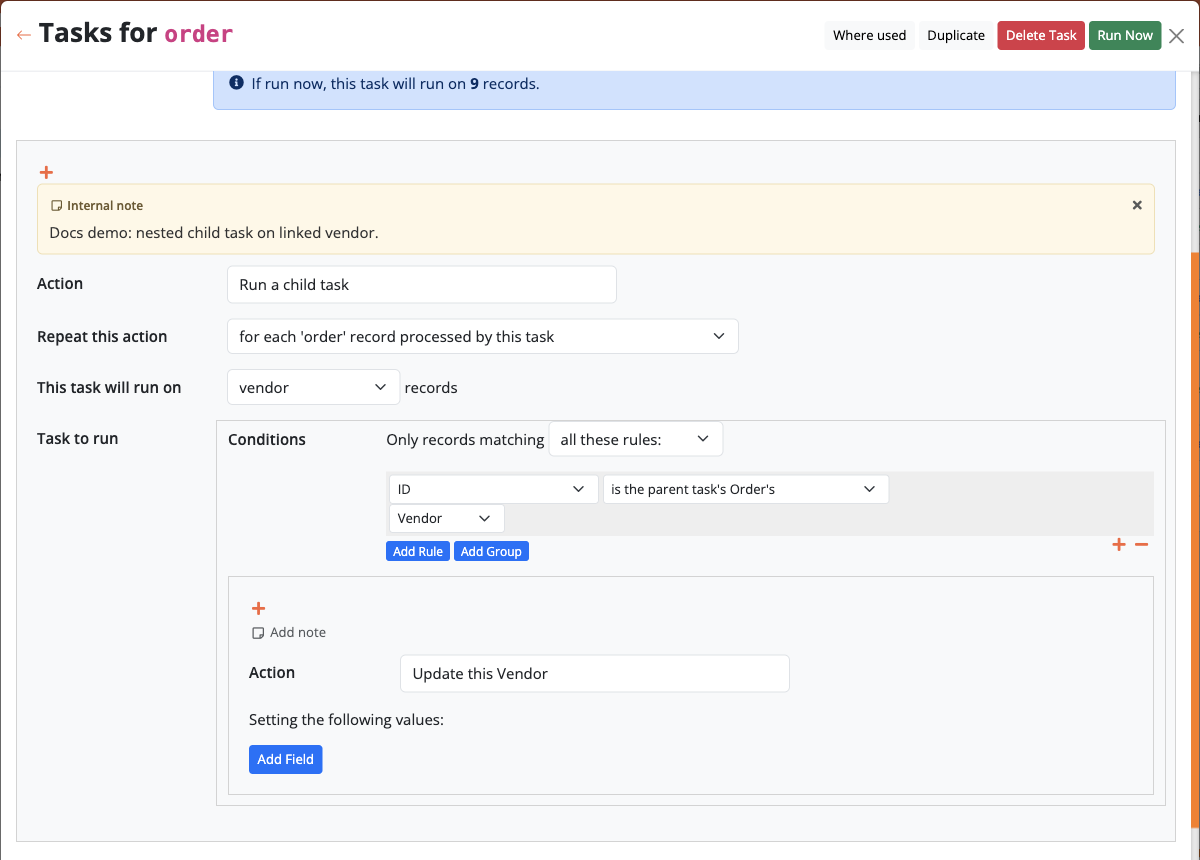
Run a child task lets one workflow kick off another on related records — without copying the same actions into every parent task. That keeps complex processes maintainable: change the child once, and every parent that calls it stays in sync.
Example
Typical scenarios:
- after creating an order, run a child task on each line item to reserve stock;
- when approving a request, update every linked document with the same status rules;
- from a batch on customers, run a standardised “send reminder” task that you also reuse from a form.
How to configure
- In the parent task, add an action and choose Run a child task.
- Set This task will run on which object’s records (the related set the child should iterate).
- Choose or define the Task to run (conditions and actions of the child).
At runtime the child sees the parent’s current record under a source labelled like the parent task's Object, so filters and field references can walk the relationship safely.
Tips
- Keep shared logic in the child and call it from forms, grids, and schedules alike.
- Combine with record operations in the child for creates/updates on related rows.
- Prefer clear names (“Reserve stock for line items”) so builders can reuse the child confidently.
See also Introduction to tasks for how multi-record actions repeat across rows.