Integrations
Bobuild apps rarely live alone. This hub points to the integration styles the product supports today and the usual patterns for connecting the rest of your stack.
In-product capabilities
| Need | Use |
|---|---|
| Interactive UI inside your website | Embedding (including WordPress) |
| Programmatic read/write | REST API |
| Build or change apps with an AI agent | AI agents (MCP) on the Builder |
| Custom UI with Bobuild-managed data | Custom View |
| Outbound messages to humans | E-mail tasks |
| Files to users | Document generation |
| Timed jobs | Scheduled tasks |
| Pick files from Microsoft SharePoint on forms (copy into a File field) | SharePoint import |
| Keep documents in SharePoint (Remote file fields + tasks) | SharePoint remote files |
Patterns without native webhooks
Bobuild does not require you to host webhook receivers for common cases. Choose an approach:
1. External system pulls Bobuild (API poll)
A mobile app, middleware, or iPaaS (Make, Zapier, custom worker) calls your API endpoints on a schedule or on demand.
Good for: syncing lists, checking status, mobile clients.
2. External system pushes into Bobuild (API write)
Partners POST into Create/Modify endpoints when something happens in their system.
Good for: receiving orders, CRM updates, form tools that can call HTTP.
3. Humans / operators as the bridge
CSV via Importer or Builder import, plus batch tasks.
Good for: low-frequency partner feeds.
4. E-mail as notification, API as system of record
Keep state in Bobuild; notify people with tasks; let other software read status via API.
Mobile apps
Treat Bobuild as the backend:
- Define role-aware API endpoints (only the fields the app needs).
- Use endpoint auth appropriate to the client (API authentication).
- Upload files as documented in Files and images.
- Keep business rules in Bobuild tasks/validation so mobile clients stay thin.
iPaaS (Make / Zapier-style)
Approximate flow:
- Trigger in the other tool (new Stripe payment, new Typeform response, …).
- HTTP request action → Bobuild Create/Modify endpoint.
- Optional: later scenario polls a Bobuild List endpoint for status.
Store API tokens in the iPaaS secret store, not in public scenarios.
SharePoint
SharePoint integration has two complementary modes:
| Mode | Field type | What happens |
|---|---|---|
| Import (copy) | File | Browse SharePoint on a form; Bobuild downloads a local copy into the field |
| Remote file (link) | Remote file | Store a pointer to the SharePoint item; open in Bobuild via cache, or open in SharePoint |
SharePoint import (copy into File)
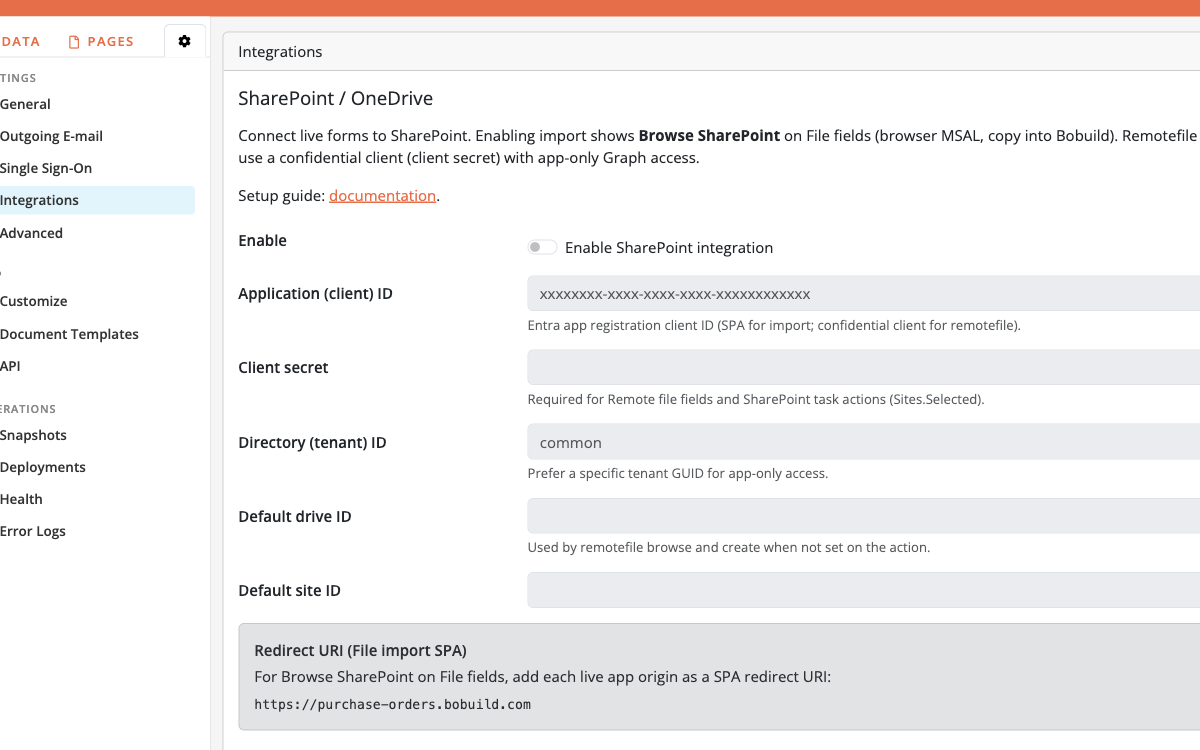
When SharePoint import is enabled, every editable File field on a live form shows Browse SharePoint. Logged-in users pick a file; Bobuild downloads it into the field like a normal upload (Microsoft tokens stay in the browser; Bobuild does not store refresh tokens).
Enable in Bobuild
- In the Builder, open Settings → Integrations.
- Enable SharePoint import.
- Paste the Entra (Azure AD) Application (client) ID.
- Optionally set Directory (tenant) ID (leave blank /
commonfor multitenant).
Entra app registration (SPA — import)
Register a single-page application (public client, PKCE — no client secret required for import):
- Add redirect URIs for every live origin (app hostname and each custom domain; wildcards are not supported).
- Enable access / ID tokens as required for SPA sign-in.
- Delegated permissions (admin consent where required): Microsoft Graph
User.Read,Files.Read.All,Sites.Read.All; SharePointMyFiles.Read,AllSites.Read.
SharePoint remote files
Remote file fields keep the document in SharePoint. Bobuild stores a JSON pointer (provider, ids, name, web_url, etag, optional cache metadata) and can download into a local cache when someone opens the file in the app.
Typical flow: generate a Docx into a File field → task Create a remote file (SharePoint) → store the pointer on a Remote file field. You can also browse-and-link (when a default drive is configured), delete the remote item, or copy a remote file back into a File field as original or PDF.
Extra settings for remote files
On the same Integrations page, for remotefile / task actions also configure:
- Client secret (confidential app registration — required for server-side Graph calls)
- Prefer a specific Tenant ID for app-only access
- Optional default drive ID / site ID (needed for browse-and-link)
Grant Graph application permission Sites.Selected and assign the app to the target site. SPA redirect URIs remain required only for File-field import (MSAL).
Custom View + external libraries
When you need a specialised widget (map, kanban, dashboard tile), keep auth and filters in Bobuild and render with JavaScript — Custom View. Prefer this over exporting data to a separate microsite when the audience already uses your portal.
Related
- Security overview — do not over-expose endpoints
- Tasks — keep status and automations in Bobuild while integrating
- Production playbook — separate staging API hosts from production