Index widget
The Index widget is a record-driven navigation list: one line per record, optional count and badge chips, optional tree indent, and links into detail or edit pages. Use it when the UI should feel like a sidebar or section navigator rather than a full data table.
Typical scenarios:
- a folder or category tree in a left rail next to a detail page;
- a list of open tickets with status badges and unread counts;
- a table of contents for hierarchical records (parent → children).
Prefer a grid when operators need many columns, bulk tasks, sorting UI, or CSV export. Prefer an Index when each row is mainly a label you click to navigate. Pair it with the page sidebar for classic master–detail layouts.
- How to configure it in the builder
- How it looks like in the resulting app
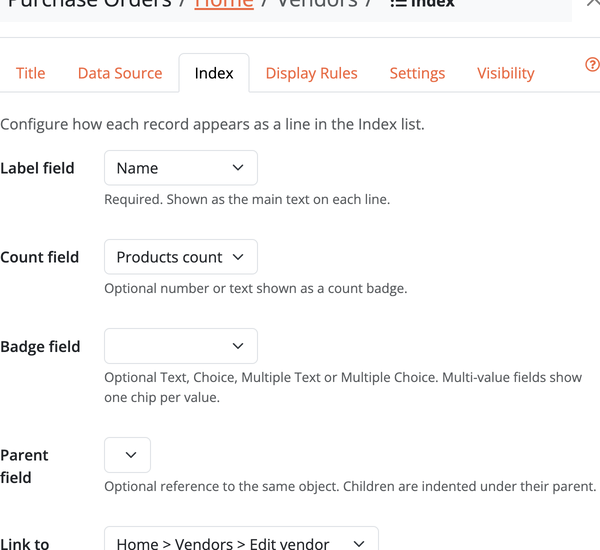
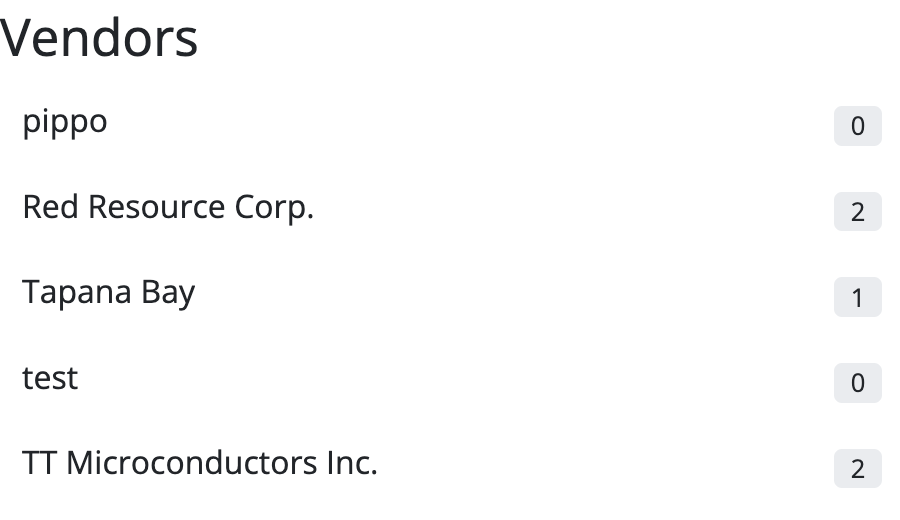
How to create an Index
- Drag an Index widget onto a page and choose the object to list.
- Set the Label field — the text shown on each line (required).
- Optionally set Count, Badge, and Parent fields (see below).
- Optionally set Link to a detail/edit page (or
:view/:editto create the child page), and whether the link opens in a popup.
Options
- Filter / conditions and sort — which records appear and in which order.
- Label — field shown as the line text.
- Count — optional number or text shown as a count badge on the right.
- Badge — optional Text, Choice, Multiple Text, or Multiple Choice field. Multi-value fields render one chip per value. For Choice / Multiple Choice, chip colours come from the per-value colour on the field definition.
- Parent — optional Reference to the same object. When both parent and child appear in the list, children are indented under their parent.
- Link to / Open in popup — where each line navigates.
- No records — message when the list is empty.
- Width and visibility — like other widgets (width applies in the main column; sidebar placement fills the rail).
The list loads up to a few hundred matching records (then rely on filters/sort to keep it useful).
Display rules
Index display rules are a small set of actions:
- Hide — omit the line
- Set color / Set background color — style the label or row
- Select — mark the line as the current selection (
aria-current), typically with a filter such as “ID is the current page record”
Place the Index in the page sidebar and link each line to a child detail page for a familiar master–detail navigation pattern.